

Fredrick Francises
Fredrick runs client projects from the first call to launch day. He is the person most of our Google reviewers mention by name.
A hacked site gets a response within 2 hours. Kansas City Web Design Pros provides website maintenance in Kansas City for businesses in 36 communities, WordPress sites and online stores included: software and plugin updates, backups, security monitoring, and malware removal when a site is hacked. Maintenance is quoted from $99 per month, or $999 per year on the annual plan, apart from the free lifetime support every build includes. Tell us about your site below and we reply within one business day.
2 hrs response to a hacked site
$99 a month, or $999 a year
Security monitoring
Updates & backups
Website maintenance is the ongoing work that keeps a live website updated, backed up and secure after launch. Maintenance from Kansas City Web Design Pros covers 4 jobs: software updates, backups, security monitoring and malware removal, handled by the same team that builds sites.
A website is not finished on launch day. It runs on software, and that software keeps changing underneath it: security fixes, new versions, plugins that stop working with each other. Maintenance is the work of keeping up with those changes so the site you paid for keeps doing its job.
The content management system, the theme and every plugin, kept current. On a WordPress site that means the WordPress core plus each plugin it runs. KC Web Design Pros maintains websites on every platform and content management system, online stores included, for businesses across the KC metro. Updates close known security holes, and an update is only finished when the site still works after it, forms and checkout included.
Copies of the site’s files and database, kept so that a failed update or a hack ends in a restore rather than a rebuild. A backup is only worth something when it restores cleanly, so restoring one is part of the job, not an afterthought. Every maintenance plan includes backups: the $99 monthly plan takes one every week, and the annual plan takes one every day.
Watching the site for malware and signs of tampering, so a problem is found by your maintenance team rather than by a customer or by a Google warning screen. The annual plan runs a malware scan every day.
Cleaning malicious code out of a hacked site, closing the hole it came through, and asking Google to clear any warning on the site. Malware removal is included in every maintenance plan.
WordPress maintenance in Kansas City covers the three layers of a WordPress site, the core, the theme and each plugin, along with the backups, security monitoring and malware removal around them. KC Web Design Pros maintains WordPress sites whoever built them, WooCommerce stores included, from the same starting price as any other site: $99 per month, or $999 per year on the annual plan.
The core, the theme and each plugin get their own updates, on their own schedules. One plugin falls behind while the rest move on, or an update to one clashes with another, which is why every update ends with a check that the pages load and the forms and checkout still work.
WordPress security sits inside the same plan. Security monitoring watches for malware, and a hacked WordPress site gets the repair set out below, with a response within 2 hours on a maintained site. Some companies call this work a WordPress care plan; here it is the same maintenance plan that covers every other platform.
Building a new WordPress site, or replacing one that can no longer be updated safely, is a different job, covered on our page about WordPress web design in Kansas City.
Free lifetime support answers your questions and makes small fixes on a site we built, while ongoing maintenance does the recurring work of keeping a site updated, backed up and secure. Support comes free with every build; maintenance is a separate service, from $99 per month.
| Free lifetime support | Website maintenance | |
|---|---|---|
| What it is | Help when you ask for it | Ongoing work done without you having to ask |
| Covers | Questions and small fixes | Updates, backups, security monitoring, malware removal |
| Who starts it | You, when you need something | Your maintenance team, on a schedule |
| Comes with | Every website we build | A monthly or annual plan |
| Cost | $0, for the life of the site | From $99/month or $999/year |
The two cover different risks. Support handles what you notice: a phone number that changed, a question about editing a page, a button that needs moving. Maintenance handles what you do not notice until it is too late: a plugin with a known security hole, a backup nobody took, a form that quietly stopped sending.
It is easy to assume that a new website’s support includes its maintenance. It does not, and Kansas City Web Design Pros would rather say so before launch than after a hack.
Yes. WordPress website help comes in the same two forms: free lifetime support for questions and small fixes on a site we built, and maintenance for the updates, backups, security monitoring and malware removal any WordPress site needs, from $99 per month. A hacked site with no plan can have a one-off cleanup for $299.
Website maintenance starts from $99 per month, or $999 per year on the annual plan, which adds a daily backup and a daily malware scan. A one-off malware cleanup for a site without a plan is $299 per website, and support on a site we built stays at $0 for life.
Three things set where a site lands from that starting point: the platform it runs on, how many plugins it uses, and whether it takes payments. A 5-page brochure site with a few plugins and a 50-page store that processes cards carry different risks and different amounts of work, so each site gets its figure in writing before any work starts.
Two other published prices sit around maintenance. The website itself is a one-time fee, from $499 for 5 to 10 pages, and maintenance is optional on top of it. Website management, maintenance included, is also part of the Premium search campaign, from $1,999 per month, for businesses that want the site and its rankings handled by one team.
Yes. Any website built on a content management system such as WordPress needs its updates applied, its backups taken and its security watched. The only choice is whether you do that yourself or hand it to a team whose job it is.
Automated attacks do not choose targets by size. Bots scan the web for sites running software with known holes, so a 6-page site for a shop in Raytown is found the same way as a national brand. Small sites get hacked because nobody is watching them, not because anyone picked them.
The part of a site that maintenance protects first is the part that earns money: the quote form, the booking button, the click-to-call link. A contractor whose estimate form silently stops sending after a plugin update loses jobs without knowing why. That form is central to web design for contractors, and it is the first thing to test after any update.
Location changes nothing about the work. Maintenance is done remotely, so a business in Gladstone on the Missouri side gets the same service as one down the road from our Olathe office, just as our web design follows the same process and prices across the metro.
Maintain a site that still does its job, and redesign one that no longer does. Maintenance keeps a working site safe and current, while a redesign replaces a site whose design, structure or platform is the reason it loses customers.
| Maintenance | Redesign | |
|---|---|---|
| The problem | Software ages and security holes appear | The site no longer works for customers or for Google |
| Signs | The site works but has not been updated in months | Not built for phones, slow theme, no room to add pages, dated beside competitors |
| What it involves | Updates, backups, security monitoring, malware removal | A new design and build, with content restructured |
| Cost here | From $99/month or $999/year | From $499 one-time for 5 to 10 pages |
| Timeline | Ongoing | As fast as 48 hours for up to 10 pages, counted from when your content arrives |
A site on a platform version that can no longer be updated safely is a redesign, not a maintenance job, because no amount of upkeep patches software its makers have stopped supporting. When the answer is not obvious, the free website audit settles it: it shows whether the problems are the kind updates fix or the kind only a rebuild fixes.
A hacked website needs its malware removed, the hole it came through closed, and a clean copy confirmed before anyone trusts it again. Malware removal is part of maintenance from Kansas City Web Design Pros, alongside the updates that close the holes infections come through. On a maintained site, the response to a hack starts within 2 hours, and a site without a plan can have a one-off cleanup for $299.
Four signs show that a site has been hacked, and all of them are visible from the outside:
A complete cleanup runs in this order:
Software that was never updated is a common way in. That is why updates and malware removal belong in the same service: the work that cleans a site is the same work that keeps it clean.
Every week for updates and security checks, every month for a tested backup and a form check, and every 12 months for a full review of speed, content and structure. That is the minimum schedule for any business website, whoever does the work.
Handing this list to a maintenance team is the point of paying for one: the work gets done whether or not anyone remembers it. The team behind it carries 20 years of combined design experience, and Kansas City Web Design Pros works from 12232 S Blackfoot Dr, Olathe, KS 66062, maintaining websites for businesses in 36 communities on both sides of State Line.
From our Olathe office
No account managers and no hand-offs. The founders you speak with on the first call stay on your project through launch, working alongside our design team.
Fredrick Francises
Fredrick runs client projects from the first call to launch day. He is the person most of our Google reviewers mention by name.

Bikash Roy
Bikash designs the websites and runs the search side for Kansas City businesses. He has eight years in web design and SEO, and builds sites that load fast on a phone and show up when customers search Google.
Our work
Click a project to open its live website in a desktop, laptop, tablet or phone frame.
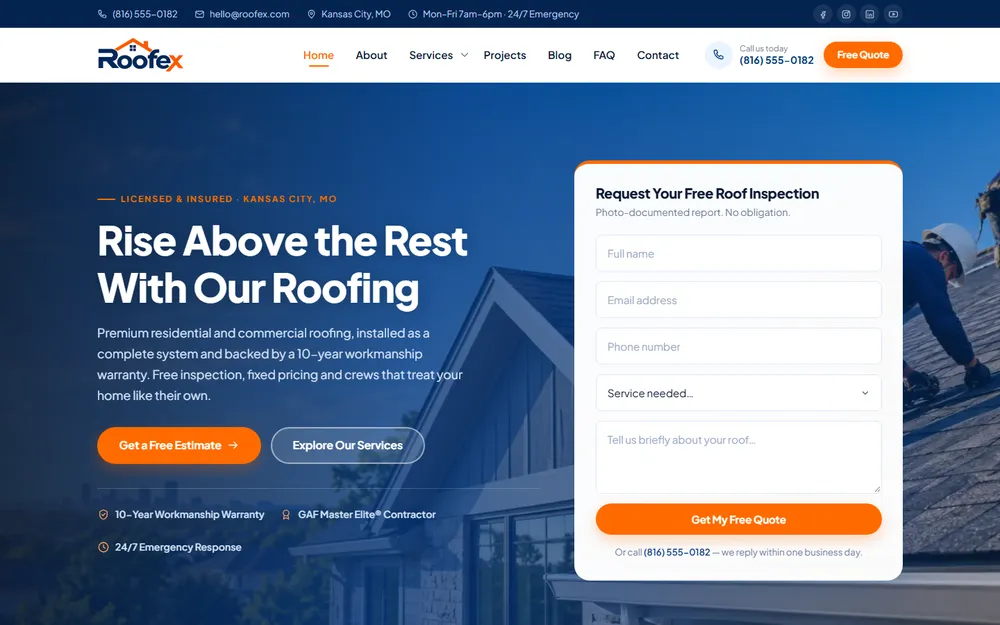
Website design for a Kansas City roofing contractor: installation, repair and restoration.
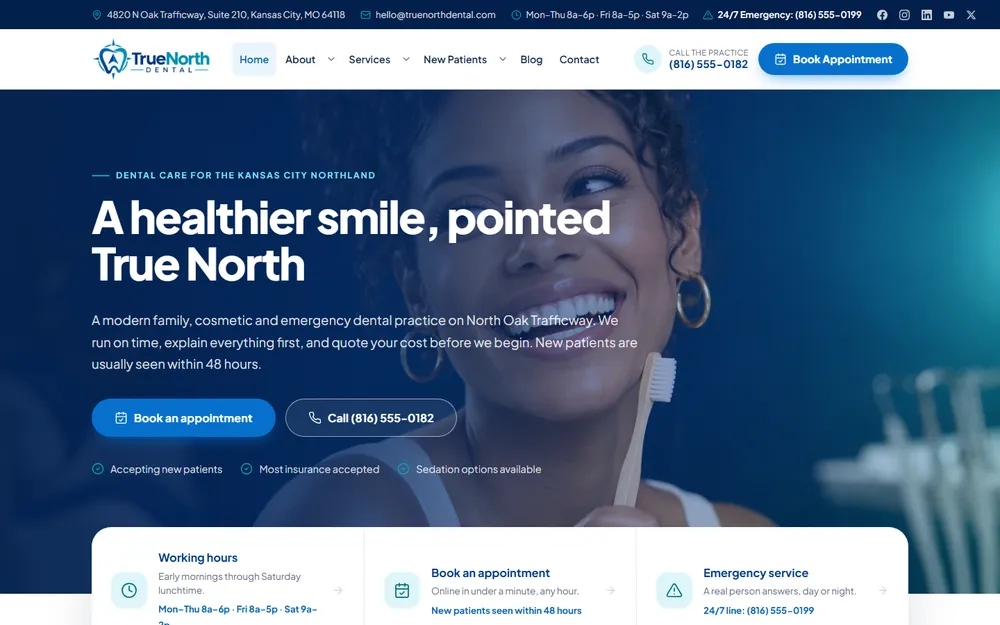
Website design for a Kansas City family and cosmetic dental practice.
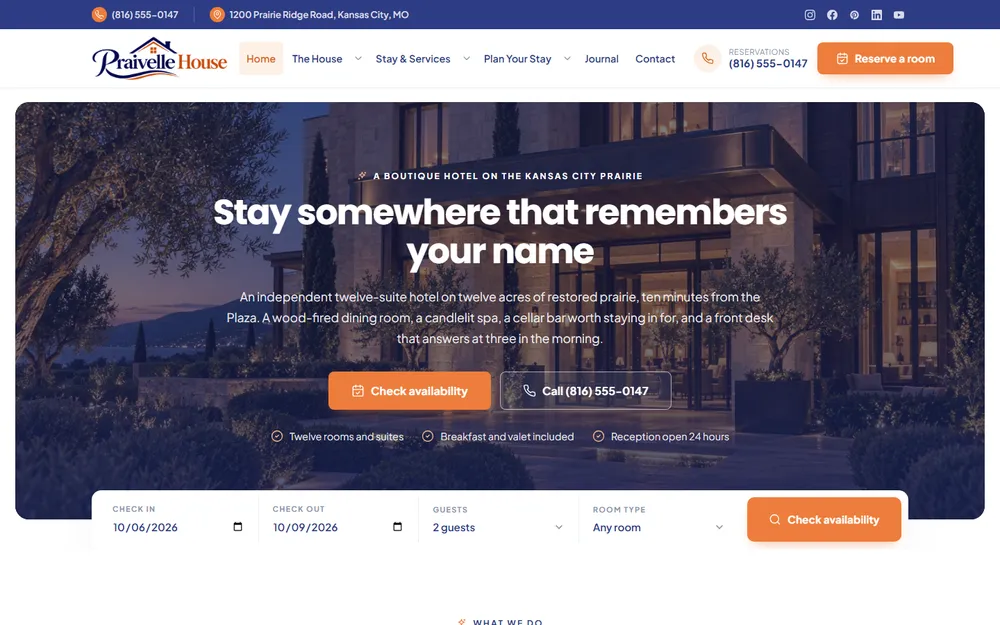
Website design for a Kansas City boutique hotel, spa and restaurant.

Website design for a Kansas City beauty salon: hair styling, facials, nail care, makeup and spa treatments.
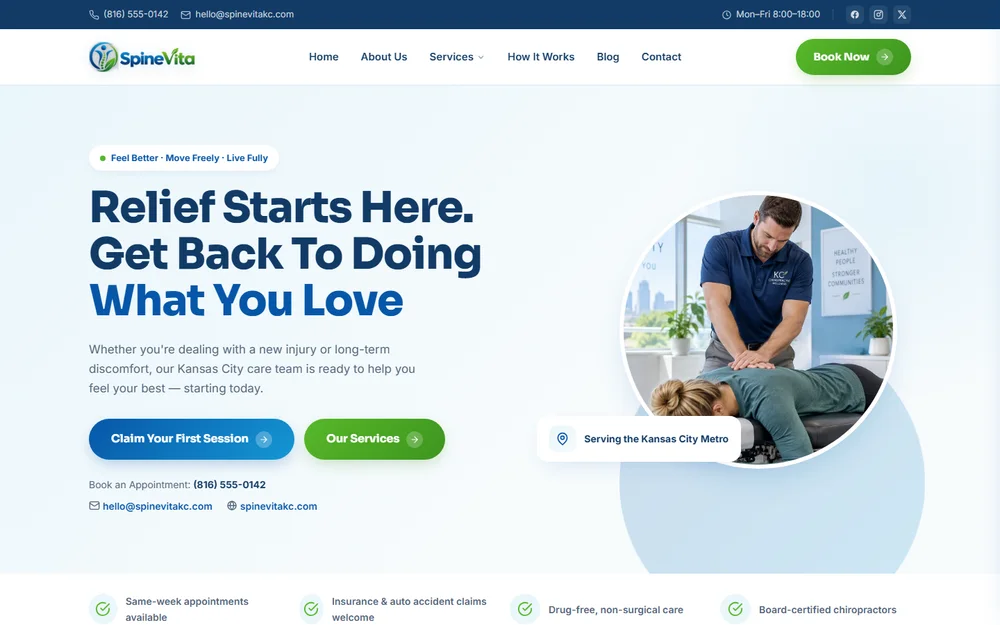
Website design for a Kansas City chiropractic clinic: injury care, sciatica relief, sports rehab and spinal decompression.
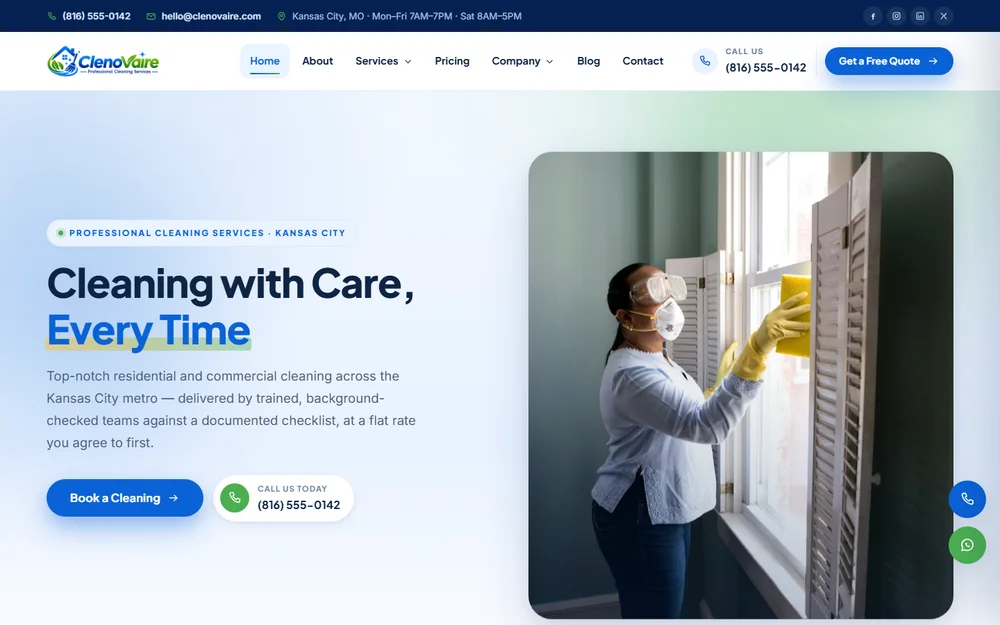
Website design for a Kansas City cleaning company: house cleaning, deep cleans, move-in and move-out, post-construction and carpet care.

Website design for a Kansas City electrician: residential and commercial wiring, panel upgrades, EV chargers and 24/7 emergency repair.
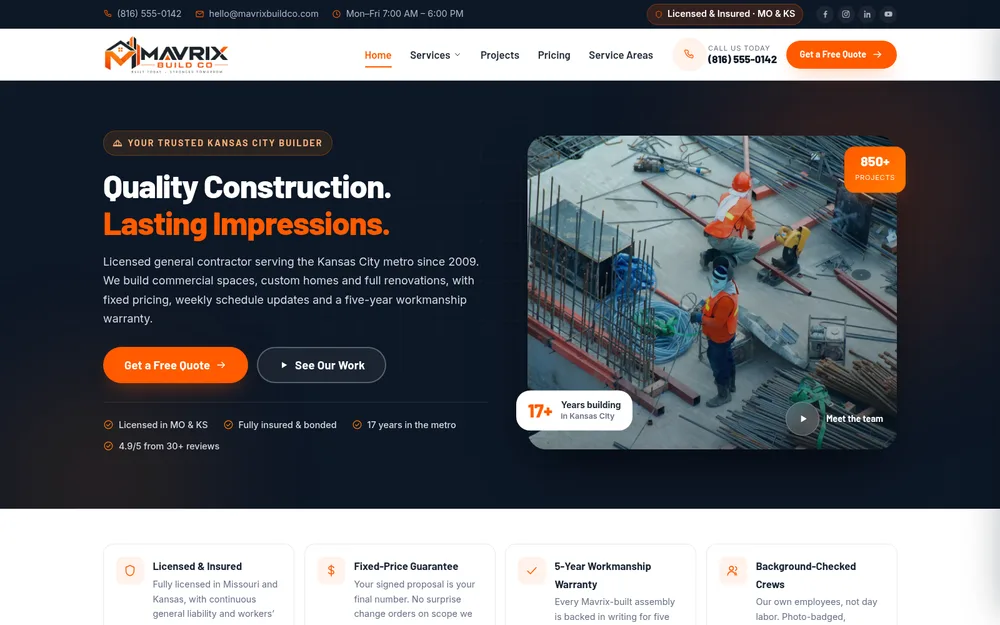
Website design for a Kansas City general contractor: commercial construction, custom homes, remodeling, roofing and concrete.
Reviews from Google
Every quote below is copied word for word from our Google Business Profile.
Your website has to function optimally, and Fredrick and the team at KCWDP don't leave anything to chance. Thorough, professional, dependable work every time, we're developing our third project together now.
 Matthew DunehooGoogle review
He has shown a unique ability to understand my business model quickly and help us build a strategy to grow with speed and precision. He's a great listener and has tremendous vision and follow through.
 Aric H.Google review
The creative vision this team brought to my project completely exceeded my expectations. They didn't just build a website; they captured the brand perfectly with a fresh, stunning design.
Fredrick was very knowledgeable and was able to fix some IT issues we were having, as well as put better securities in place to protect our systems. His communication was great and very prompt with his work.
 Jenn ChismGoogle review
They work closely with you to ensure you're getting the best possible service and really help you turn your ideas into reality. The end product looked gorgeous, performed perfectly and was very responsive.
 Vlad RaduGoogle review
I had an amazing experience working with Fredrick! He was extremely quick to respond, professional, and very helpful throughout the entire process of building my website.
Right off the bat you feel like you're not a client but a friend. The knowledge and creativity they have at their disposal seems neverending.
 Joshua WestonGoogle review
They were fast, friendly and explained everything very clearly to meet my needs. Will definitely be using them again!
Fredrick and his team were professional and the work was done quickly and looks great!
 Sir AustinGoogle review
Fredrick and his team went above and beyond, truly care and I am so grateful to have stumbled across them!
 Nicholas V. LoScalzoGoogle review
Kansas City Web Design Pros knew exactly what my project needed to go to the next level.
 Bethany HackmannGoogle review
Delivered a modern, responsive website that perfectly captures our brand.
 GbgGoogle review
Thanks for bringing my idea to life.
Straight answers
Still have a question?
A real person in Olathe replies within one business day.
No. Every website Kansas City Web Design Pros builds comes with free lifetime support for questions and small fixes. Ongoing maintenance, meaning updates, backups, security monitoring and malware removal, is a separate service, from $99 per month, or $999 per year on the annual plan.
Maintenance starts from $99 per month, or $999 per year on the annual plan, which adds a daily backup and a daily malware scan. The platform, the number of plugins and whether the site takes payments set the final figure, and you get it in writing before any work starts.
Yes. Malware removal is part of website maintenance, along with updates, backups and security monitoring. The cleanup removes the malicious code, closes the hole it came through, and asks Google to lift any warning on the site. A one-off cleanup for a site without a maintenance plan is $299 per website.
Yes. Our WordPress maintenance covers sites whoever built them: the core, the theme and each plugin kept current, plus backups, security monitoring and malware removal, from $99 per month, or $999 per year on the annual plan. Online stores built on WooCommerce are included.
Yes. A small site runs the same software as a large one and is found by the same automated attacks. Fewer pages means less work, which shows up in the quote, not in the risk.
Support is help when you ask for it: questions and small fixes, free for life on every site we build. Maintenance is ongoing work nobody has to ask for: updates, backups, security monitoring and malware removal.
We maintain websites for businesses in 36 communities across the Kansas City metro, on both the Kansas and Missouri sides, from our office at 12232 S Blackfoot Dr, Olathe, KS 66062. Businesses outside the metro are welcome too, and meet us by phone, Zoom or Google Meet, by appointment.
Kansas City Web Design Pros (KC Web Design Pros) is a web design and SEO company at 12232 S Blackfoot Dr, Olathe, KS 66062, serving the Kansas City Metro across 36 communities in Kansas and Missouri. Call (913) 448-1315 (+1-913-448-1315) or use the form above. Open Monday through Saturday, 9 AM to 5 PM. Closed Sunday.